
Current final-horde and reconnect checks
The v0.9.23 notes report the final horde arriving simultaneously for everyone, matchmaking excluding already-started rooms and more time to reconnect. Reload to a matching original version before diagnosing an older symptom. If the warning remains, record each player’s version and the room state.
Season 3 adds shared map events and team Rifts, with each player choosing a Relic after the Alpha falls. Ranked co-op runs contribute clan points. Personal menu protection, unanimous team-pause voting and a disconnected player remain separate states. No shared run was completed during this review.
Checked November 11, 2026 against original v0.9.23 / mwaj5w8h. Original release history and definitions ↗ (external website, opens in a new tab) and Charcher’s announcements ↗ (external website, opens in a new tab). Source-based instructions. Extraction, recovery, installation and competitive results were not playtested.
October 29 · original .75: Current co-op requires a registered trainer account. Read the public-matchmaking and signal-wheel rules below; older Guest or controller instructions do not override them.[6]
October 28 · original v0.8.68 review: The .60 notes supersede blanket solo-only Look advice: win challenges can count in co-op using team victory and each player’s own actions. At-most-N-hits challenges remain solo. The room also supports Bag selections consumed when the run starts.[5]
What co-op includes now
The v0.8.48 client has a dedicated Co-op flow and a 2–4 trainer label. It offers Create a room and Join with a code. Its availability states distinguish closed Beta, maintenance and a temporary pause. Friends, clans and leaderboards remain separate social systems.[1]
| Your goal | Use this feature | Important boundary |
|---|---|---|
| Enter the same run | Co-op room, invite or room code | Both access eligibility and working player connections are required. |
| Find someone to invite | Friends | Adding a friend is not the same as joining their run. |
| Participate in clan activity | Clans | Clan membership alone does not create a shared arena. |
| Compare a team result | Co-op leaderboard | The result is a record, not evidence that a new room is currently available. |
Checked October 25, v0.8.48. This page establishes documented features and entry steps. We did not join a real multiplayer session, verify every account’s Beta eligibility or test cross-device play.
Create or join a room in order
- Open the original project. Use pokebonk.com — original game ↗ (external website, opens in a new tab) and keep the account/session with your existing progress.
- Check Co-op availability. If the screen says closed Beta, maintenance or paused, follow that message. A working solo menu is not proof that new co-op rooms can be created.
- Choose who creates the room. The creator selects the available destination and difficulty, then invites friends or shares the room code/link.
- Join the same room. Other trainers use the invitation or Join with a code. Inspect the room’s player cards; change your own partner through your card and the League selection.
- Resolve version or connection warnings before Start. The client checks player-to-player readiness. When a version mismatch appears, everyone should reload the original page and check the version again.
The client first attempts browser-to-browser connections and documents relay fallback when direct connections are blocked. We have not tested router, VPN or corporate-network fixes; do not install an unofficial client or disable device protections on the strength of a generic connection tip.[1]
Pause, menus, reviving and current team rules
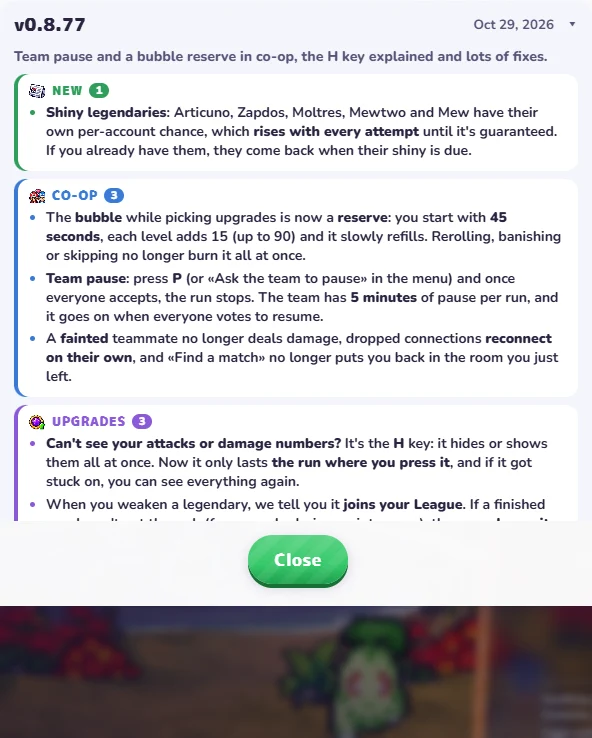
Team pause is available from v0.8.77. Press P or use Ask the team to pause. The world stops once everyone accepts. The team has a five-minute pause budget per run and resumes when everyone votes to continue. Opening your menu alone does not establish a team pause.
Upgrade protection uses a reserve: the v0.8.77 notes describe 45 seconds initially, +15 seconds per level up to 90, and gradual refill. Reroll, banish and skip no longer consume it all at once. This replaces the older five-seconds-per-level, ten-second-cap rule.
Version 0.9.13 reports a fix for protection remaining stuck after an Ultimate or level-up. Check the loaded version before treating the symptom as an intended mechanic. Use the actual teammate prompt to revive and keep its readiness message with any report. No shared match, pause timing or revival was tested here.
When joining or starting fails
| What the screen says | Next action | What not to infer |
|---|---|---|
| Different version | Reload the original page on each participant and compare the displayed version. | A matching website address does not guarantee matching cached builds. |
| Closed Beta / no access | Use the account’s actual eligibility message and the project’s announcements. | No player limit workaround or invite-code purchase is verified here. |
| Maintenance / paused | Wait for the project’s stated reopening; solo and running rooms may behave differently. | This is not proof that the whole game or your save is broken. |
| Players not connected | Read the room’s network warning and record which participants fail to connect. | We have no universal tested router or browser fix. |
For repeated failures, give PokeBonk support ↗ (external website, opens in a new tab) the game version, browser, room warning and time. Do not share passwords or session credentials.
Is this the Megabonk multiplayer mod?
No. This guide covers the separate PokeBonk browser project. Megabonk mod-manager instructions apply to the Steam game. They do not create a PokeBonk room or change your Beta eligibility.
Room prerequisites and the latest replay correction
Version boundary: this guide covers the original pokebonk.com v0.8.55, checked October 26. Our Play window uses a separate third-party v0.8.27 source with separate progress. Newer co-op, Treasures and Archive changes may be absent there.
Use the four-character room code or share link from the room’s actual invite controls. At least two trainers are needed to start, and the room supports up to four. Every participant needs the selected destination and difficulty unlocked; the host’s unlock alone is insufficient. Compare player-card readiness and versions before Start.[3]
The project describes relay fallback when a direct browser connection is blocked. This is a fallback, not a guaranteed fix for every network. The v0.8.51–.52 notes reduce room polling/relay traffic; .54 corrects skipped zones when replaying with the same team. A previous room warning should be rechecked against the current build.[4]
League progress follows the encounter’s own rules. From .60, Looks can count in co-op except at-most-N-hits challenges; check the specific requirement. For clan membership use the clan entry checklist; joining a clan does not launch co-op. No cross-play or real multiplayer completion test is claimed here.
Choose Team Survival without importing the solo schedule
In original .68, select Survival in the co-op room. The release notes specify a shared boss every four minutes; fallen teammates return when the team beats the next boss. The team leaderboard ranks survival time. Solo Survival’s five-minute milestone table and nominal 45-minute Mewtwo should not be treated as the team’s boss sequence.
The notes name Cataclysm and Apocalypse, but do not provide a complete winning route here. We have not completed a Team Survival run, measured revival timing or validated a team record.
[5]Find a public match and keep the room moving
Use a registered trainer account for public matchmaking. In Find a match choose mode, team size, map and difficulty, or Any. A friends’ room can use Find teammates. Check every participant’s destination unlocks, readiness and version.
The original v0.8.85 notes replace the old idle-leader timing with 30 seconds to start and add a kick vote. Use the live room message when a leader transfers. The G / L3 signal wheel and current rebindable controls remain separate from pause and upgrade protection.
For a bubble that remains after an Ultimate, check the v0.9.13 correction and the issue-specific report checklist.
Sources & checks
November 6 check: original release history v0.8.77–v0.9.14. Described fixes were not reproduced; apps, recovery and multiplayer were not tested. Original project release notes ↗ (external website, opens in a new tab)
Mechanics and calculations use the original project’s dated data; recommendations are editorial, not measured winning routes.
- Original public game client ↗ (external website, opens in a new tab) · Room entry and connection flow, v0.8.48, 25 Oct 2026.
- Original project release notes ↗ (external website, opens in a new tab) · Co-op release notes, v0.8.42–48, 24–25 Oct 2026.
- PokeBonk client ↗ (external website, opens in a new tab) · Lobby and multiplayer mechanics, v0.8.55, 26 Oct 2026.
- PokeBonk definitions ↗ (external website, opens in a new tab) · Co-op definitions and changes, v0.8.55, 26 Oct 2026.
- PokeBonk definitions ↗ (external website, opens in a new tab) · Co-op corrections, v0.8.68, 28 Oct 2026.
- PokeBonk definitions ↗ (external website, opens in a new tab) · Account and lobby changes, v0.8.75, 29 Oct 2026.