
iPhone, iPad and controller changes to check
Use the original browser entry on iPhone or iPad and check the displayed version. Version 0.9.20 reports lower-memory zone changes and fewer Safari music retries. Version 0.9.23 makes the controller Back action close an open window.
If the symptom persists, record device, OS, browser, host and version. Keep the existing profile before comparing another browser. Current Android/Mac app announcements do not establish an iOS app or a tested device-performance guarantee. For an interrupted run, follow the saved-run checks.
Checked November 11, 2026 against original v0.9.23 / mwaj5w8h. Original release history and definitions ↗ (external website, opens in a new tab) and Charcher’s announcements ↗ (external website, opens in a new tab). Source-based instructions. Extraction, recovery, installation and competitive results were not playtested.
October 28 · original v0.8.68 review: The .59 notes address iOS 15 Retry loading failures; this is a reported fix, not our physical-device test. Historical .60 bindings were later superseded by the .72–.73 controls below. Recheck your current bindings and the host version.
Use the browser route first
Open pokebonk.com — original browser game ↗ (external website, opens in a new tab) on the phone you intend to use. JavaScript and WebGL are required by the project’s entry page. Start with the device’s current browser rather than a reposted game inside another app.
- Keep an existing Guest in its original browser profile. Do not clear it as a first troubleshooting step.
- Let the game load, then rotate to landscape if portrait leaves the controls cramped.
- Check movement, camera and the visible action buttons before committing to a longer run.
- Read the current graphics options if performance is poor; reduce workload one setting at a time and compare the result.
What the touch layout changes
The current client defines an on-screen movement stick and touch actions for movement skills, interaction, aiming and Ultimate. It also includes touch settings and graphics controls. These definitions establish available controls; they do not establish device compatibility.
| Task | Phone check | If it does not work |
|---|---|---|
| Movement | Move with the on-screen stick. | Check whether touch controls are enabled and the playfield is focused. |
| Camera | Try the camera area away from buttons. | Separate camera gestures from action taps; inspect the current controls menu. |
| Interaction | Look for the contextual action. | Get within prompt range; an absent prompt is different from an unresponsive button. |
| Reading upgrades | Check labels at landscape width. | Pause or change layout before selecting; do not guess from clipped text. |
Keyboard advice such as “press R” describes the desktop default. On a phone, use the corresponding displayed button rather than assuming there is a physical-key requirement.
Android APK and iPhone download questions
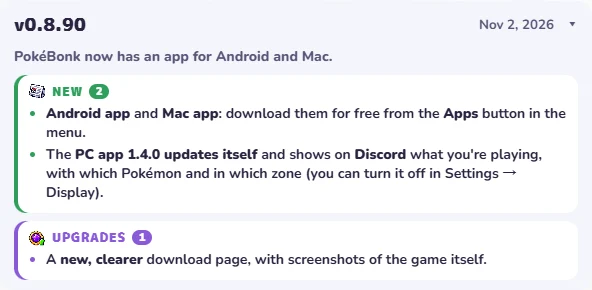
The original project now provides apps. Open pokebonk.com ↗ (external website, opens in a new tab) and use Apps to inspect the current platform list and download destination. Current client text lists Windows, macOS, Linux and Android; v0.8.90 announces Android and Mac downloads. Our October browser-only distribution reference is historical.
- Choose the original project’s Apps route or its browser route.
- Check the exact publisher, release and destination before installing a separately maintained package.
- For iPhone, use the browser route unless the original menu explicitly provides another supported route. The Android listing does not establish an iOS-native app.
- Keep the browser session that holds your progress while checking account access in another client.
We inspected entry and release menus and public client text. No installer, offline support or account transfer was tested. A third-party offline port can use local progression, so its import/export instructions must be checked separately.
Choose the next step by the symptom
The October 25 notes describe a fallback that tries another graphics adapter if 3D initialization fails and shows a more specific explanation. Follow that displayed advice before erasing browser data. This is a documented recovery behavior, not a tested fix for every phone.
Recent mobile changes also keep the “Not now” action visible at Bill’s Machine and allow cancellation when banishing. If you leave fullscreen, later runs should no longer re-enter it automatically. Check your current build before treating an older control screenshot as the present layout.
The original page requires JavaScript/WebGL and includes a Retry recovery action for failed client loading. Its recovery code reloads game resources rather than asking the player to erase all site data.
| What you see | Next check | Evidence boundary |
|---|---|---|
| Page says JavaScript or WebGL is needed | Check browser settings and whether 3D graphics work in that browser. | A prerequisite check; not a confirmed fix for every device. |
| Menu loads but play is slow | Inspect graphics quality and resolution options; compare a lower workload. | No measured speedup or universal best setting. |
| Retry screen or failed resource loading | Use the displayed Retry action and record a repeated error. | Original client recovery flow; not an account reset. |
| Guest appears missing | Return to the original browser/profile before changing data. | Account recovery is not verified by this guide. |
Settings → Graphics now includes an FPS cap (unlimited, 30, 60, 90, 120 or 144). A lower cap is an option to compare for consistency or device workload; it does not increase the device’s maximum rendering ability.
If the problem persists, report device model, browser version, game version and the visible error to PokeBonk community support ↗ (external website, opens in a new tab). Do not send passwords.
Controller, touch UI and crowded co-op effects
Version boundary: this guide covers the original pokebonk.com v0.8.55, checked October 26. Our Play window uses a separate third-party v0.8.27 source with separate progress. Newer co-op, Treasures and Archive changes may be absent there.
The public client contains gamepad handling as well as touch controls. Test movement, camera, interaction and menu selection separately; a browser detecting a gamepad does not prove its button mapping matches your device. Click/focus the game field before checking keyboard input, and use the original host when comparing a frame issue.
If connecting a gamepad hides the touch controls, check the input settings and report the device/browser combination to project support. A setting that reliably keeps both layouts active has not been confirmed. Include the controller model and which controls disappear.
Version .51 adds teammate-attack visibility options: simplify or hide those effects when they obscure the arena. Compare one setting at a time. The existing FPS cap limits rendering work; it does not raise maximum device performance.
No official numeric minimum OS/RAM or tested device matrix was found. Browser/WebGL prerequisites and a real-device performance guarantee are different claims. Menu lag is not proof that a downloadable native client exists.
Use the symptom checklist for loading, server and save problems.
Read the current control or readiness rule
The .73 release notes (checked October 29): signal wheel ↗ (external website, opens in a new tab) uses G / L3. The .72 big-map action defaults to R3 and is bindable in Settings → Keys; older L3-release / Select-map advice is superseded. Check your own bindings.
If you can jump but cannot move, or menus will not scroll
First check the version. The v0.9.10 notes repair a v0.9.9 phone/tablet joystick regression that allowed jumping but prevented movement. Version 0.9.12 repairs touch scrolling in menus; v0.9.11 updates Android menu sizing. Read the current input settings after updating.
For iPhone/Safari zone-change crashes, v0.9.14 reports changes to memory handling and return-from-app behavior. These are developer-reported corrections, not a tested device guarantee. If the issue remains, report device, browser/app, game version and the exact transition.
Sources & checks
November 6 check: original release history v0.8.77–v0.9.14. Described fixes were not reproduced; apps, recovery and multiplayer were not tested. Original project release notes ↗ (external website, opens in a new tab)
This guide uses project menus, client definitions and dated release notes. Physical-phone performance, battery use and account recovery were not tested.
- PokeBonk entry ↗ (external website, opens in a new tab) / legal notice ↗ (external website, opens in a new tab) · Browser requirements and distribution; 23 Oct 2026.
- v0.8.48 client ↗ (external website, opens in a new tab) / release notes ↗ (external website, opens in a new tab) · Touch, FPS and fullscreen settings; checked 25 Oct 2026.
- v0.8.55 client ↗ (external website, opens in a new tab) / definitions ↗ (external website, opens in a new tab) · Controller handling and teammate-effect settings; 26 Oct 2026.
- v0.8.68 notes ↗ (external website, opens in a new tab) / v0.8.75 notes ↗ (external website, opens in a new tab) · Later control changes; 28–29 Oct 2026.
Español: móvil y descarga · Steam Deck setup and stuck-input checks