
Saved runs, missing captures and iOS loading
Version 0.9.23 reports that saved runs no longer expire after two days or close automatically on return, and recovered captures are retained. If an older guide tells you to finish within two days, update the original client and inspect Continue on the same account before abandoning the run.
- Record the exact host, account or Guest, version and visible error.
- Keep the browser profile that owns the session. Check Continue and wait for its server response.
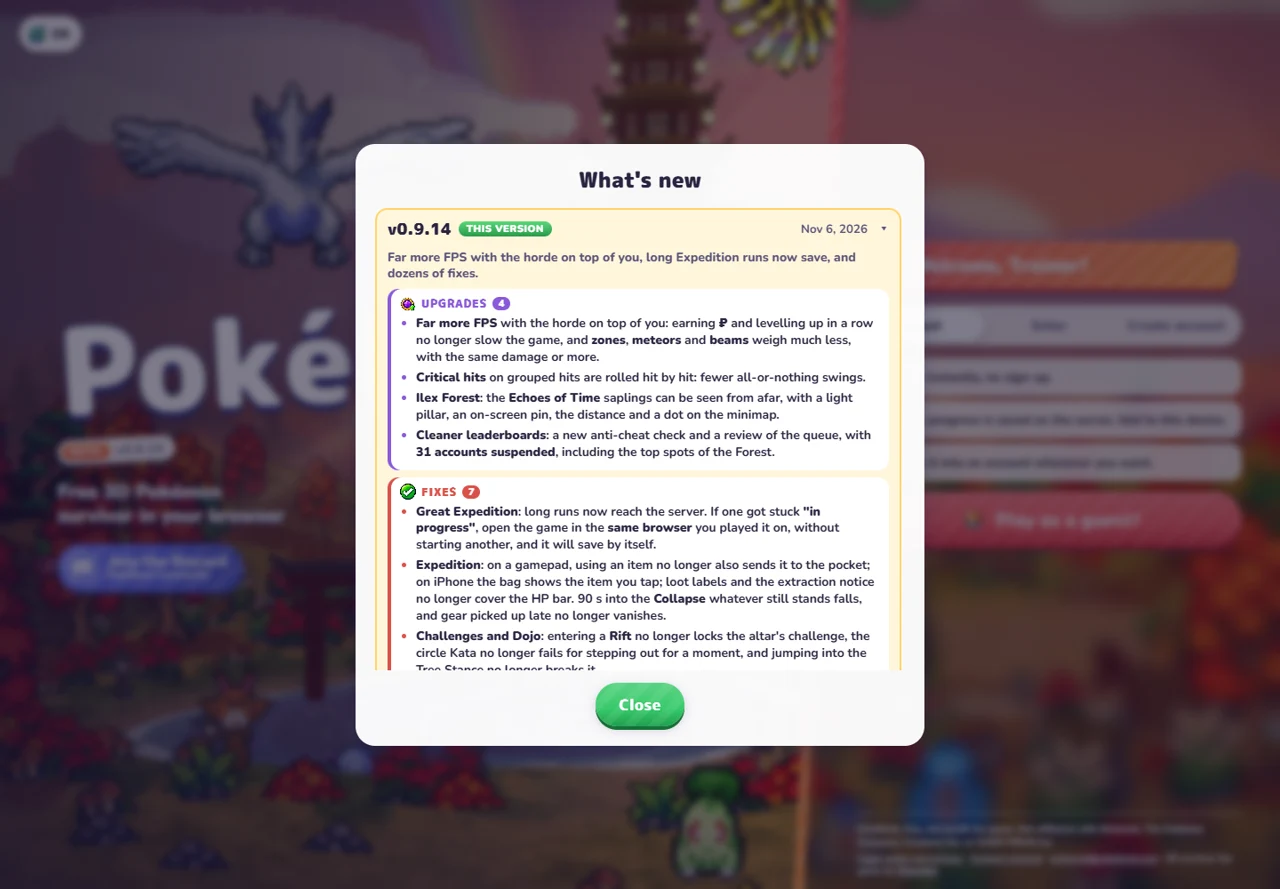
- For an Expedition still in progress, keep the same browser and avoid starting another run. Version 0.9.17 says the previous Expedition is submitted before another begins.
- If recovery still fails, use Report with mode, map, difficulty, Pokémon and reproduction steps. This guide cannot restore server records.
Version 0.9.20 changes iPhone/iPad zone-transition memory use and Safari music retries. Check those versions before applying an old workaround. These are developer-reported corrections.
Checked November 11, 2026 against original v0.9.23 / mwaj5w8h. Original release history and definitions ↗ (external website, opens in a new tab) and Charcher’s announcements ↗ (external website, opens in a new tab). Source-based instructions. Extraction, recovery, installation and competitive results were not playtested.
Check your version first
Version boundary: this guide covers the original pokebonk.com v0.8.55, checked October 26. Our Play window uses a separate third-party v0.8.27 source with separate progress. Newer co-op, Treasures and Archive changes may be absent there.
[1][2]Use the narrowest matching branch
| Symptom | First useful check | Safe next step / limit |
|---|---|---|
| Blank page / failed client load | Does the original page show Retry or a resource error? | Use the displayed Retry, record the error and version, then compare in another browser without deleting the original profile. |
| Menu but no 3D / WebGL warning | Does the browser allow WebGL and hardware acceleration? | Follow the specific graphics-startup message. .46 documents another-adapter fallback; no universal hardware fix is established. |
| Menus or combat are slow | Separate local FPS from server wait messages. | Compare one graphics setting at a time; do not infer an outage just from low FPS. |
| No Connection to the Server | Check the same original host, network and live status message. | A public status snapshot can age. Keep account/session data and note the time; do not reinstall an unofficial wrapper as an assumed fix. |
| Different version / co-op cannot start | Every teammate’s build, destination/difficulty unlock and room readiness. | Reload original clients, inspect the exact room warning and use the co-op checklist. Router/relay success is not guaranteed. |
| Progress appears missing | Same host, named account versus Guest, same browser profile. | Return to the original session. This site’s third-party Play source does not share original progress. |
| Upgrade returns/refunds immediately | Exact item/upgrade, balance before/after, and server acceptance. | Stop repeating the purchase; capture the response and report it. No confirmed root cause or repair is available in the cited report. |
Original game support: PokeBonk Discord ↗ (external website, opens in a new tab). Include browser/device, exact host, version, UTC/local time and the visible message. Keep passwords, session tokens and private account details out of public reports.
What the recent reports actually establish
Nabu69: Candy/upgrade progression is refunded immediately, despite switching browsers; displayed 17h old when sampled October 26. One unresolved report, no verified cause or fix.[3]
Fishing-Queasy: a server-connection warning; displayed two days old. A reply recommends reinstalling an app, but that is unverified and may destroy a wrapper’s local session, so it is not our repair instruction.[4]
Splatulated: asks about a native client because the browser menu lags; displayed four days old. This is a request, not proof of an official downloadable client or a specific graphics fault.[5]
Translate the “new version” message
Hay una versión nueva de PokéBonk: recarga la página para seguir jugando means “A new PokeBonk version is available; reload the page to keep playing.” It is a client/server version notice, not an instruction to download an installer. In a third-party frame, refreshing the outer guide may not update the provider’s hosted build. Check that source’s version or use the original game with the correct account.
We previously observed a different, older third-party source refuse run creation with HTTP 426. That observation applies to that source and build; it does not diagnose a current original-game report. Our current Play source is separately identified on its page.
Before erasing site data
The original policy describes server-saved Guests with browser session credentials and deletion after 60 days of inactivity. A server save does not make your current credentials disposable. Keep the existing profile, inspect Guest-to-account options and obtain project support before destructive resets. Conversion, recovery and inactivity deletion were not tested here.
[6]Distinguish a saved run from a missing account
Original v0.8.63 adds Save and quit from pause in Classic, Daily Mutation and Survival. It is unavailable during a boss fight or event. Wait for a successful save before closing. On return, Continue resumes; Finish ends the stored run and keeps earned progress.
If the request fails or the game cannot load a stored run, record the exact message and host/version before clearing anything. This guide cannot restore server records. Our planner JSON is a draft backup, not a game-save export. Runs under one minute are hidden from history/rankings in .63 even though their progress still counts.
Read the save-and-quit checklist →
[7]Read the current control or readiness rule
The .72 notes address Save & quit stuck at Wait a moment in long runs. This is an announced fix, not a recovery test. Record the current host, version and error before clearing data. An idle public search or leader transfer can be expected lobby behavior.
[8]Match the new report to the exact correction
| Symptom | Next check | Evidence boundary |
|---|---|---|
| Jump works but phone movement fails | Check for the v0.9.9 joystick regression and v0.9.10 correction; update through the original route. | No device fix reproduced here. |
| Touch menus will not scroll | Check the v0.9.12 menu-scrolling correction and Android app/menu sizing. | A menu issue differs from server access. |
| Co-op bubble stays active after an Ultimate or level-up | Check v0.9.13, then record the remaining symptom and version. | No confirmed universal Esc or restart repair. |
| Expedition remains in progress after a long run | Follow v0.9.14: return in the same browser without starting another run. | Developer instruction; no successful recovery test. |
| Intel Mac or Steam Deck AppImage will not open | Record app version, system/architecture, publisher and startup error; inspect the original Apps release. | No reproduced cause or verified command-line workaround. |
When another browser shows a fresh profile
Compare the exact host, named account versus Guest and browser profile before clearing site data. A local offline-port profile and the original online account are different environments. Check the account identity sequence.
When “No Connection to the Server” appears
Record the time, host, version and where access fails. Check the project’s current maintenance or version message, then use its Retry action if shown. A single report does not establish a service-wide outage. Keep session credentials intact while distinguishing connectivity from missing results.
Sources & checks
November 6 check: original release history v0.8.77–v0.9.14. Described fixes were not reproduced; apps, recovery and multiplayer were not tested. Original project release notes ↗ (external website, opens in a new tab)
Mechanics and calculations use the original project’s dated data; recommendations are editorial, not measured winning routes.
- PokeBonk client ↗ (external website, opens in a new tab) · Loading, connection and purchase handling, v0.8.55, 26 Oct 2026.
- PokeBonk definitions ↗ (external website, opens in a new tab) · Related definitions and release changes, v0.8.55, 26 Oct 2026.
- Reddit — Nabu69 ↗ (external website, opens in a new tab) · Unresolved refunded-purchase report, sampled 26 Oct 2026.
- Reddit — Fishing-Queasy ↗ (external website, opens in a new tab) · Connection report with unverified reply, sampled 26 Oct 2026.
- Reddit — Splatulated ↗ (external website, opens in a new tab) · Native-client/menu-lag question, sampled 26 Oct 2026.
- pokebonk.com — privacy and Guest policy ↗ (external website, opens in a new tab) · Guest session and 60-day inactivity policy; not a recovery service.
- PokeBonk definitions ↗ (external website, opens in a new tab) · Error-handling corrections, v0.8.68, 28 Oct 2026.
- PokeBonk definitions ↗ (external website, opens in a new tab) · Announced save/lobby fixes, v0.8.75, 29 Oct 2026.