
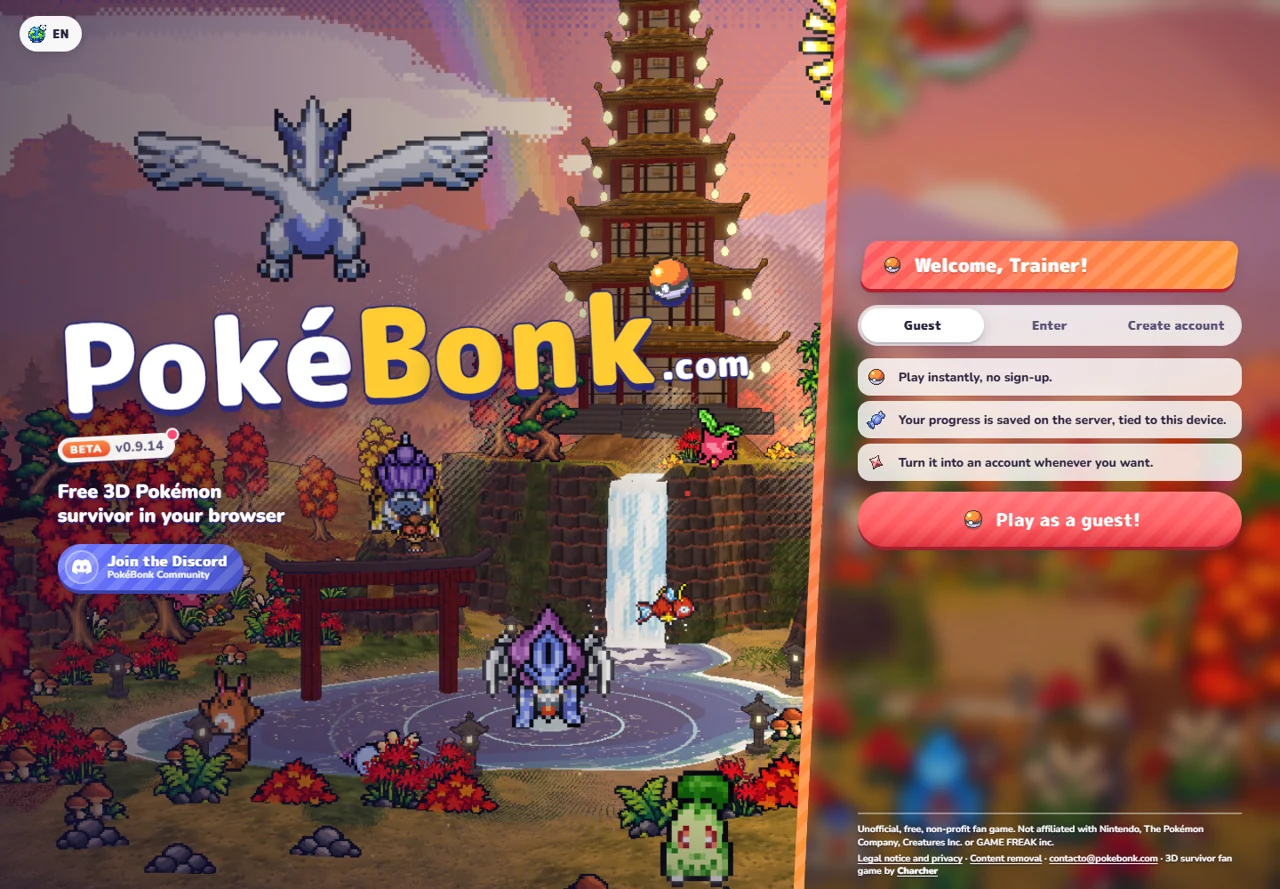
Start at the original game
Go to pokebonk.com — original game ↗ (external website, opens in a new tab). The entry screen offers Guest, Enter and Create account. Use Enter for an existing named account. The Guest screen says progress is saved on the server and tied to the current device.
- If you already have progress, use that same browser profile first.
- For a new Guest, select Guest and use “Play as a guest!”.
- On a fresh profile, follow the starter selection. On an existing profile, continue into the League through Play.
- Read the chosen partner’s passive and move kit. Confirm the partner, then inspect the available region, mode and difficulty before starting.
Keep the current controls nearby
These are defaults in the v0.8.48 client. Saved rebindings take priority. Open Settings and its Keys section if an action differs; level-up shortcuts are contextual, not ordinary attack keys.
| Action | Current default | When to use it |
|---|---|---|
| Move | W A S D | Move while checking the camera direction. |
| Jump / slide | Space / Left Shift | Separate movement actions; check readiness and terrain. |
| Interact | E | Use the prompt beside a nearby object. |
| Ultimate | R | Activate when ready; Y toggles auto Ultimate. |
| Aim / lock | Q / right mouse | Change aiming mode or target lock. |
| Map / pause | M / P | Inspect the map or pause before reading. |
| Upgrade tools | F / X / Z | Reroll / skip / banish in the level-up context, when available. |
Your equipped moves attack automatically. Movement, camera control, aiming and upgrade decisions still need attention. Use pause to read rather than testing unfamiliar shortcuts in a crowded wave.
Read the first upgrade by what it changes
Level-up choices can add or improve a move or change a stat. Read the full card and the current move slots before confirming. A new move, an upgrade to an existing move and a stat bonus are different decisions in the current client.
- Need recovery? Check whether the offer actually restores HP or changes regeneration; extra damage is a different effect.
- Improving damage? Compare the affected damage class and move type with your current kit.
- Managing movement? Learn what the current mobility option does before replacing a choice that already works for you.
Choose by what your current kit needs; available upgrades depend on the run.
Protect the Guest you already have
The project’s policy (checked October 23) says unused Guest accounts ↗ (external website, opens in a new tab) are deleted after 60 days. Local browser storage keeps session information; a server-saved run does not mean a different browser automatically has the credentials to access it.
Before clearing site data or switching profiles, inspect the original game’s option to save the existing Guest to an account. Keep your current session until the conversion is confirmed.
For missing progress, keep the displayed version and error text and use the project’s Discord support ↗ (external website, opens in a new tab). This guide cannot recover or access game accounts.
Before the next run
Do I need to download it?
The original entry is a browser game. No installer is needed for that route.
Is it a Megabonk mod?
It has a separate website, client and account system. Start it through PokeBonk, rather than a Megabonk mod manager.
Which starter should I pick?
Use the role you want to learn: recovery with Bulbasaur, defensive bonuses with Squirtle, or a Fire-focused kit with Charmander. These are passive-based suggestions, not measured win rates.
Registration status and the account you already have
Version boundary: this guide covers the original pokebonk.com v0.8.55, checked October 26. Our Play window uses a separate third-party v0.8.27 source with separate progress. Newer co-op, Treasures and Archive changes may be absent there.
October 26 snapshot: the original menu showed Guest entry; the public status listed registration as open and maintenance as off. This establishes that snapshot’s settings, not permanent open registration, successful account creation or a healthy co-op session.
- Already have progress? Use Enter in the same original host/profile before creating another Guest.
- New player? Read the current Guest/Create account screen. Follow any changed eligibility notice instead of buying an unverified invite code.
- Saving a Guest? Keep its existing browser session while inspecting the game’s save-to-account action.
- Different host? The embedded third-party Play source has separate accounts and progress. It cannot prove that your original save disappeared.
The public status can change; use api.pokebonk.com current status ↗ (external website, opens in a new tab) alongside the actual menu, not as proof that every endpoint works. For a repeated failure, use the error-specific checklist.
Play the first run as a sequence
After choosing an available partner, select Classic, an unlocked map and a difficulty you can enter. For learning, we suggest Viridian Forest on Normal when available. Move into open space, collect experience and read the first level-up card: adding an attack, improving an existing move and taking a vitamin solve different problems.
Inspect the guardian objective and its nearby prompt. After winning that fight, collect the intended Great Ball reward and follow the portal. A finite Classic win requires the final encounter and exit; Survival instead continues through milestones. Return to the Lab with your actual accepted rewards and choose one upgrade that addresses the last failure.
For the complete objective chain and timer trap, use how to finish Classic. This summary is a learning plan, not a recorded clear.
Before changing browser, account or host
Different browser or website? Keep the old profile open and confirm the exact domain and trainer identity first. Our Play source and other third-party editions are separate from pokebonk.com; a familiar title does not establish shared progress.
Want to keep a Guest? Inspect Save to account from the existing session. Confirm the game says it is preserving that Guest before leaving.
Want deletion? Signing out or clearing browser data does not establish server deletion. The original project’s legal notice explains deletion requests ↗ (external website, opens in a new tab) through its contact route; use the contact in that original notice rather than sending a game password to this guide.
Want offline play? The original entry requires the web client and its account service. We have not verified a supported offline edition or accepted offline results. A local shortcut or cached screen does not prove either.
Find the project’s support, not a lookalike login
The original legal notice links the project Discord for community and support. For Reddit, local-language forums or repositories, verify who operates the destination; the current Apps route links the project’s releases; Baha and Dcinside identities were not established in this check. Use the original project’s current links to check that identity.
Looking for the Pokémon game from a video? Distinguish PokeBonk from PokéSurvivor before following account, input or build instructions.
New task-specific additions reviewed October 28 against the original v0.8.62 client; recommendations remain source-based.
A supplementary creator introduction
YouTube — CD喜德: starter choice and first Lab spending ↗ (external website, opens in a new tab)
Creator and title checked October 28 through YouTube metadata. The video has a Chinese title; narration, chapters and current-version timings were not independently reviewed. Use it as an optional introduction alongside the checked written reference, not as our gameplay test.
Looking for the game, a first run, or a build?
For the game overview and all available guides, start at the PokeBonk homepage. To launch the separately hosted browser edition, open Play PokeBonk and read its version and save notice before starting. This page covers first-run setup and controls.
Choose a partner with the starter comparison, then use the build planner to check a specific setup. If you searched for Pokémon Megabonk, the game comparison explains which project these guides cover. A launch page, a beginner route and a build plan answer different tasks.
Check a missing save before changing anything
- Confirm the host. Keep the original browser/profile open. A separately hosted game or offline port can use a different save environment.
- Confirm the trainer. Use Enter for the named account you already own. For a Guest, inspect Save to account from the existing session before changing browsers.
- Name the missing part. League collection, Lab upgrades, a completed result and an unfinished run require separate checks.
- Check the save response. Wait for the current game’s success notice and confirm the trainer and progress before leaving the original session.
The v0.8.85 notes announce account-backed continuation on another device and autosave recovery. That applies to the original account service; it does not establish transfer to independent offline ports. For an Expedition result stuck “in progress”, v0.9.14 specifically instructs opening the same browser without starting another run so it can retry saving. If it remains missing, record version, mode, time and result for project support.
Need another distribution? The original Apps menu now lists supported releases. See the current app and browser distinction.
Sources & checks
November 6 check: original release history v0.8.77–v0.9.14. Described fixes were not reproduced; apps, recovery and multiplayer were not tested. Original project release notes ↗ (external website, opens in a new tab)
Entry menus were inspected; later steps come from the dated public client. Account conversion, recovery and a complete original-game run were not tested.
- PokeBonk entry ↗ (external website, opens in a new tab) / v0.8.55 menu ↗ (external website, opens in a new tab) · Guest/account screens; 25–26 Oct 2026.
- Original client ↗ (external website, opens in a new tab) / v0.8.62 client ↗ (external website, opens in a new tab) · Controls and first-run decisions; October snapshots through 28 Oct 2026.
- PokeBonk legal notice ↗ (external website, opens in a new tab) · Guest inactivity and session policy; 23 Oct 2026.
- Public status ↗ (external website, opens in a new tab) · Registration/maintenance snapshot; 26 Oct 2026, not live availability.
Cheats, trainers and account rules
Checked October 28: the original project prohibits modifying the game, automating runs or manipulating server communications. Its stated consequences include removal from rankings and possible suspension. We have not verified an authorized cheat menu, trainer or account-unlock tool. For progression, use the League requirements and Lab cost decisions instead of treating a third-party download as an official shortcut.