
Compatibility evidence: what each layer proves
| Evidence layer | What we checked | What remains open |
|---|---|---|
| Original launcher | Current 30 October launcher has coarse-pointer handling and attempts fullscreen/landscape where APIs allow it. | A physical phone’s GPU, touch layout and complete run. |
| Browser capability | WebGPU plus a usable adapter are required. | A browser brand alone does not prove device compatibility. |
| Android Winlator reports | The starsforfeelings thread contains success and startup failures. | A universal GPU driver or preset; reports from one thread are not independent tests. |
| iPhone / iPad | No native app or tested iOS device matrix was established here. | Successful physical-device sessions and persistent save transfer. |
Read 30 October 2026: the mobile thread mixes browser access failures with Windows-under-Winlator experiences. Preserve model, GPU, browser/Winlator version, game build and exact symptom when asking for help. Do not promote a driver suggestion from one reply into a universal fix. [2]
Before importing progress, confirm that this particular route can open menus and select upgrades. Steam Deck uses a separate reported route →[3]
Choose between two different routes
| Route | What it uses | Evidence limit |
|---|---|---|
| Original browser page | The phone browser, its GPU access and the game’s input handling. | Launcher/client support is not a tested-device compatibility list. |
| Windows build through Winlator | A Windows build and a community compatibility layer on Android. | One public player reports success; no universal configuration or performance guarantee is established here. |
The Winlator report is by Reddit user starsforfeelings; other replies report mixed browser outcomes. Its indexed and displayed dates disagree, so we do not assign it an exact publication date. [2]
Winlator closes at startup: separate the failure layers
A Windows executable closing in Winlator is a different failure from the original browser reporting no WebGPU. In the starsforfeelings thread, Zigarahz reports a one-second launch followed by closure on a Samsung Fold 7; doctor-ase reports the same on an S25+. These are two replies in one thread, not two independent compatibility tests. Re-read 2 November 2026; the page and search-cache dates disagree, so exact comment dates are unconfirmed. [2]
| What happens | Useful next check | Evidence boundary |
|---|---|---|
| Windows executable closes immediately | Record device/GPU, Winlator version, container settings and the original game build before changing one setting at a time. | The thread does not establish a universal working preset or the cause of these closures. |
| Browser says no WebGPU | Check the original host directly and whether that browser exposes a usable graphics adapter. | A Winlator graphics-driver suggestion does not fix a browser capability warning. |
| Scene opens but characters are invisible | Report that rendering symptom separately, with host, browser and GPU. | A visible menu is not proof that the world renders correctly. |
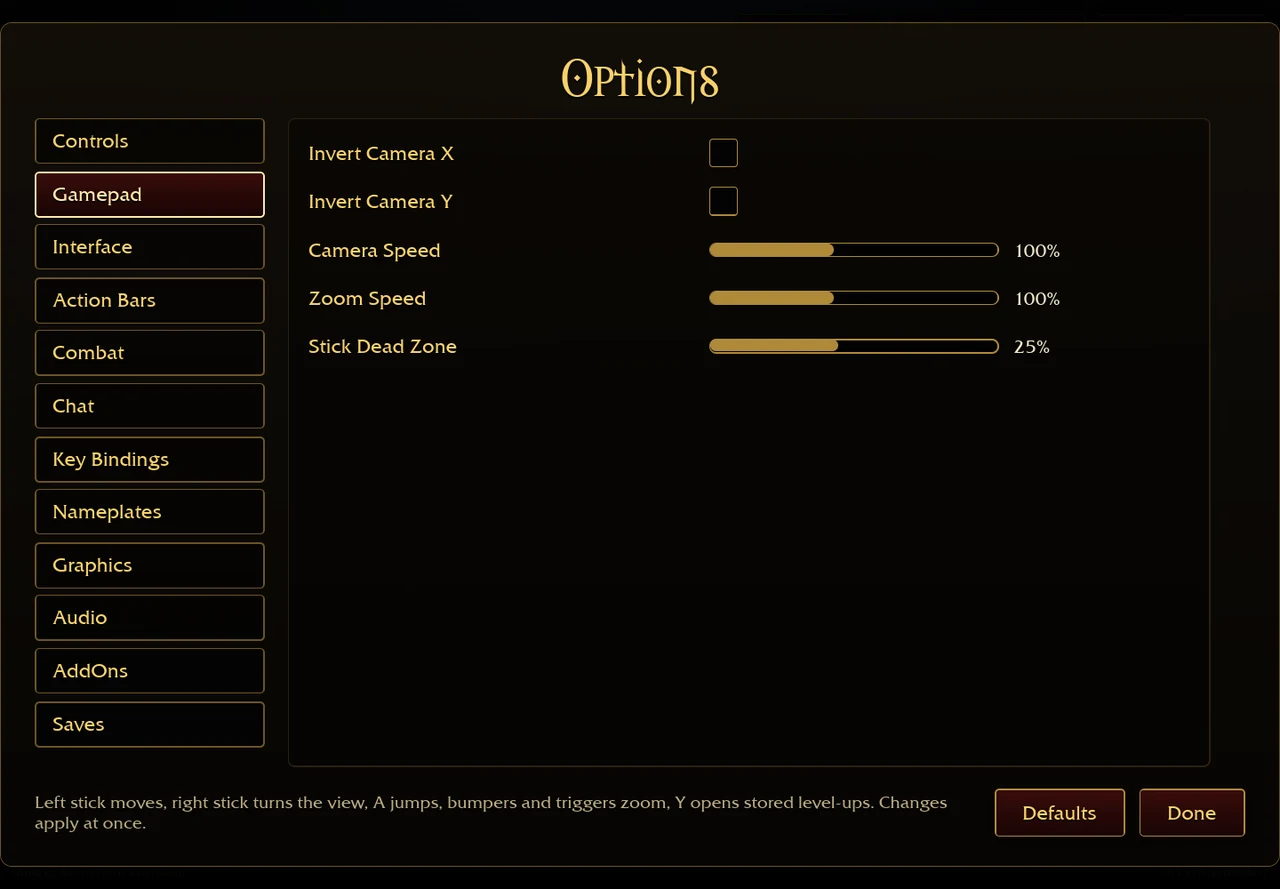
| Game opens but movement is missing | Check the selected input route: Winlator overlay controls and the original Gamepad menu are separate layers. | The desktop Gamepad screenshot above is not a tested phone touch layout. |
A reply suggests changing the container driver from Turnip to Vortek. It is an unconfirmed suggestion in this thread, not a fix verified by the affected players or this site; do not treat it as a recommended preset for every GPU. Preserve your current settings and save export before experimenting. [2]
If you change browser or client, first export progress from the working source and back up the destination. Confirm menus, movement and upgrade selection before importing; a successful launch alone does not verify save persistence. Use the export order → · Separate loading and graphics errors →
Steam Deck: separate a player report from a verified setup
A Reddit post by NastyGnar describes using the Windows build on Steam Deck; another participant says it does not launch. We read the thread on 30 October 2026, but its indexed date and displayed relative date differ. We have not watched and reproduced the complete installation video, selected a Proton version or completed a Deck run. [4]
| Your goal | Supported next step | Still unverified |
|---|---|---|
| Get the original Windows archive | Use the Windows link on Aethus’s original page, then preserve your export before changing clients. [1] | A universal Proton configuration or performance target. |
| Use a controller | Check the original Gamepad menu and test movement, camera and upgrades. See the inspected controls → | Every browser/controller mapping and physical Deck behaviour. |
| Move progress | Export both source and destination before import. Use the backup order → | Automatic browser-to-desktop synchronization. |
The GitHub reconstruction is a separate client; a successful installation of it does not validate the current original Windows build. Ask for the exact host, build, launch error and compatibility-layer version when comparing reports. [5]
Browser checks, in order
- Open Aethus’s original game ↗ (external website, opens in a new tab) directly, outside an embedded frame.
- If the page reports no WebGPU, update the browser and inspect whether the device exposes the required GPU feature. Do not use a PC-only flag as a blanket phone fix.
- Let the initial download complete; note whether its progress counter moves. A server quota message is a different branch from a GPU warning.
- Inspect the actual touch/input controls before committing to a long run. A larger display does not prove that all inputs work on your device.
- If the original browser route is unsuitable, retain the PC save and check current original-author/community guidance for your device. Do not install a purported mobile port just because it uses the game’s name.
Your PC and phone do not share storage automatically
Export from the client where your progress exists; export any phone progress separately before importing. Import replaces the destination. Keep both original files until heroes, equipment and zone unlocks match your intention. Browser addon installation is separate again. [6][7]
What has and has not been checked
We inspected the original launcher and client text and read the public mobile report. We have not completed a run on a physical Android phone, iPhone or iPad, benchmarked Winlator, or verified every cross-version save transfer. Device model, GPU, browser, game version and the exact warning are more useful troubleshooting details than “mobile does not work”.
Sources & checks
- Aethus · browser launcher ↗ (external website, opens in a new tab) · Original-host, WebGPU and startup checks, 29 Oct 2026.
- Reddit · starsforfeelings and replies ↗ (external website, opens in a new tab) · Read 29 October 2026. One Winlator report and mixed browser replies; page and search-cache dates differ, so the exact post date is unconfirmed.
- Aethus · original v0.130.0 ↗ (external website, opens in a new tab) · Touch/input and menu definitions, v0.127.0–0.130.0, 29–30 Oct 2026.
- Reddit · NastyGnar and replies ↗ (external website, opens in a new tab) · Read 30 October 2026. Author reports a Windows-build Steam Deck route; a reply reports failure to launch.
- GitHub · community reconstruction ↗ (external website, opens in a new tab) · A separate reconstruction, not a current original-client data source. Its values must not be combined with the original game.
- Aethus · browser save bridge ↗ (external website, opens in a new tab) · Save export and import handling, 29 Oct 2026; cross-version recovery not tested.
- Aethus · browser addon installer ↗ (external website, opens in a new tab) · Inspected 29 October 2026. ZIP handling, per-browser IndexedDB files and next-run loading.