
Original and third-party Play are different save locations
Our Play guide now opens Aethus’s original in a new tab. The former embedded window used a separate third-party provider. These export instructions describe the original. A guide URL and a game-frame URL are different storage locations. Return to the provider and browser where the progress exists before exporting. We have not verified original-to-third-party import compatibility; preserve both sides before any replacement. Read the former-host save precautions →[1]
Where is the browser save?
Browser progress belongs to the game address and browser profile; it is not automatically a portable file in Downloads. Use Options → Saves → Export Save to create the .sav file you can move. Its download location depends on your browser’s download settings. [2]
The original launcher inspected 29 October reads the browser localStorage key rogue.characters, then rogue.characters.backup.1 as a fallback when offering “Download your save”. This describes that browser launcher, not a Windows desktop save-folder path. This implementation detail is scoped to the launcher inspected on 29 October 2026. [3]
- Return to the same original host, browser and profile first.
- If the game opens, export through its Saves menu. If a launcher recovery download is offered, preserve that file unchanged.
- If neither is available, keep the old profile intact while looking for an earlier exported file. Do not clear site data as a recovery step.
- Back up the destination separately before importing; inspect the resulting heroes and equipment.
No cloud synchronization, recovery from erased storage or desktop directory is verified here.
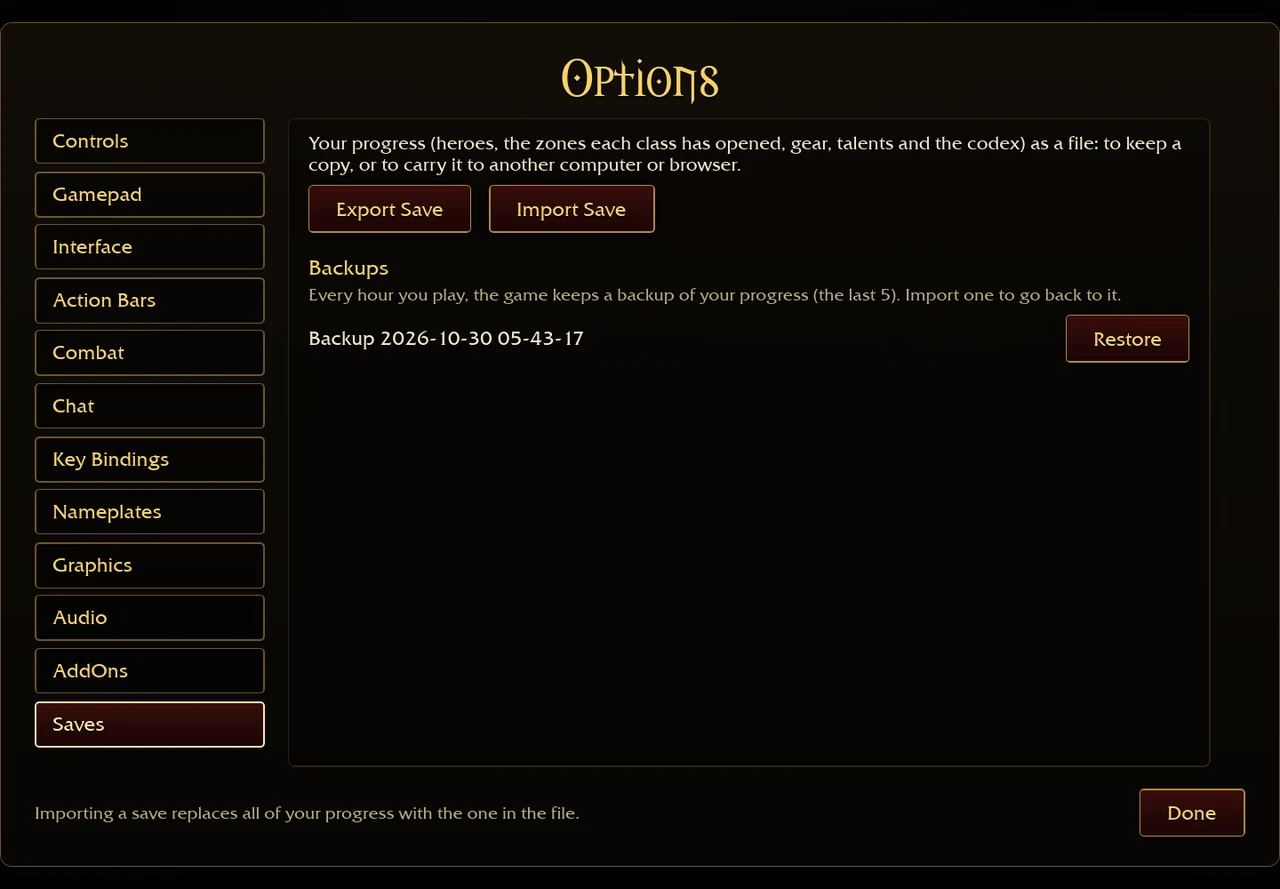
Make a copy before changing anything
- Return to the original browser, profile and game address where the progress exists.
- Open Options → Saves → Export Save. Keep the original .sav file unchanged.
- Name your own backup folder by date and note the game version. Do not edit the file to make a rejected import look valid.
- If the destination already has progress, export that separately before selecting Import Save there.
The save bridge creates a dated AzerothSurvivors .sav download. Client text says the file carries heroes, each class’s opened zones, gear, talents and Codex progress. [2][1]
Import, then check the result
- Transfer a copy of the file to the other device yourself.
- Open Options → Saves → Import Save in the intended destination browser.
- Read the replacement warning and confirm only if this is the branch you want there.
- Inspect the hero, opened zones, equipment and talents before deleting either backup.
The bridge only hands file text to the game; the client validates it. We have not tested every cross-version import, so a rejected file is a reason to keep the original and compare versions, not to alter its contents. [2]
If progress is missing
| Situation | First place to look | Boundary |
|---|---|---|
| Different browser/profile/device | The earlier browser and profile on the original address. | Storage is not automatically the same across clients. |
| A recent mistake | Options → Saves → Backups. | The current text describes hourly play backups, retaining five; these are local copies. |
| Old mirror or framed page | Its own export/recovery control, if present. | The original launcher contains a fallback export for a stored save or newest backup. This guide cannot access another site’s storage. |
| Cleared storage and no export | Any file backup you already kept. | We cannot reconstruct missing progress or guarantee recovery. |
Save editors: browser utility or a separate desktop tool?
Two community projects have different requirements. The author documentation below was read on 2 November 2026; neither has been tested by this site with the current original client. A documented editor exists, but that is separate from proving that a modified save imports and persists.
| Project | Author-described approach | Version and persistence boundary |
|---|---|---|
| yssadora / Shilen | Browser-based .sav editing; the public utility is labelled v1.5.3. | Its README reports a Firefox game-persistence problem from one comparison; the underlying cause remains unconfirmed. [4] |
| oppahansi / AZS Save Editor | A desktop editor that reads game data from your own game executable. | README names game 0.104.0 as its latest tested version; the repository is archived. Do not treat that as current 0.139.0 validation. [5] |
GitHub · browser editor source and documentation ↗ (external website, opens in a new tab) · GitHub · desktop editor source and documentation ↗ (external website, opens in a new tab)
- Export a fresh save from the host and browser where your progress exists, and keep an untouched copy. Export the destination separately as well.
- Match the tool’s documented format and version to the intended client before changing a copy. Do not treat an old test label as universal support.
- If you choose to import a modified copy, remember that the game replaces the account progress; it does not merge newer Codex discoveries or another character branch.
- Inspect the result immediately and export it. Check persistence after the next run and export again before discarding any backup. If it reverts or is rejected, preserve the original and record the exact tool, game build, host and browser.
The browser utility author recommends checking before and after a run and retaining the original. This is an attributed verification workflow, not a successful import performed here or a guarantee that editing is supported by the game. [4][2]
Cheat Engine tables and edited saves
No Cheat Engine table or save editor has been validated by this site for the original current build. Browser, downloaded original and community reconstruction are separate targets; a table labelled only “Azeroth Survivors” does not establish compatibility. This is a compatibility limit, not evidence that every memory editor fails.
The built-in export/import path above preserves a portable copy; importing replaces the destination rather than merging progress. Keep untouched exports of both sides before trying third-party tools. A working import does not verify the contents of an edited file. [2]
Cheats, cheat codes and addon commands
Checked 5 November 2026: this guide has no verified working cheat-code list or Cheat Engine table for the current original game. The dated menu and save documentation cited here do not establish a player code-entry workflow. That evidence cannot prove that every private tool or later build lacks one.
| Search or file | What it changes | Evidence to check |
|---|---|---|
| Cheat Engine table / trainer | A running process or its memory | Exact client, build and process. A native Windows table does not establish browser WebAssembly compatibility. |
| Save editor / unlocked save | Exported progress imported into a destination | Tool version, source host and a retained original backup. Import replaces progress. |
| Addon command | A particular addon interface | The addon author’s command documentation. A HUD command does not demonstrate an unlock code. |
For documented community editors, use the section above. For gameplay or graphics changes, compare the mod and client routes →. A tool described as a mod, editor or trainer needs its own compatibility evidence. [2]
Sources & checks
- Aethus · original game ↗ (external website, opens in a new tab) · Save menu and import warnings, v0.127.0–0.130.0; 29 Oct–1 Nov 2026.
- Aethus · browser save bridge ↗ (external website, opens in a new tab) · Save export and import handling, 29 Oct 2026; cross-version recovery not tested.
- Aethus · browser launcher ↗ (external website, opens in a new tab) · Original-host, WebGPU and startup checks, 29 Oct 2026.
- yssadora / Shilen · browser save editor ↗ (external website, opens in a new tab) · README and public editor page read 2 November 2026, labelled v1.5.3. Local-browser processing and a reported Firefox persistence issue are author documentation, not our test; no current-game import, edited save or executable was run here.
- oppahansi · AZS Save Editor ↗ (external website, opens in a new tab) · README read 2 November 2026; repository shown archived 21 October. Author lists latest tested game 0.104.0 and reads game data from the user’s executable.