
Looking for mods beyond a HUD or meter?
Choose the mod and client comparison → for HD Overhaul, Together and community rebuilds. Those projects have different installation and save boundaries. This page covers addons installed through the original client’s AddOns system.
Choose the smallest tool that answers your question
| Need | First option | Why |
|---|---|---|
| Only total damage | The built-in damage meter | No community package needed. |
| Per-spell damage and DPS windows | AZS Spell Meter | The author documents spell rows, proc attribution and configurable windows. |
| A complete HUD replacement | Check the original author’s compatibility notes | A replacement UI changes more than a single measurement window. |
GitHub · AZS Spell Meter releases ↗ (external website, opens in a new tab) — use the author’s release, then read its requirements. [3]
Choose an author project by the job
| Project / author | Documented use | Open / source |
|---|---|---|
| AZS Spell Meter · kex0 | Per-spell and timed damage views; use only when the built-in totals do not answer the question. | /azsm GitHub · author project ↗ (external website, opens in a new tab)[3] |
| SurvivorsDragonUi · migwynkriid13 | Movable HUD, frames and layout editor. Compare with the stock interface before combining HUD replacements. | /sdui GitHub · author project ↗ (external website, opens in a new tab)[4] |
| Azerloot · Kindagrey | Author documents a loot book, wishlist, build planning and recent-run chronicle. | /azl GitHub · author project ↗ (external website, opens in a new tab)[5] |
The two additional author READMEs were read 1 November 2026. Features are author-reported; current-game compatibility is not certified here. Follow each author’s release and installation instructions, install one relevant package first, then check it in a short attempt. These are external downloads, not files hosted by this guide.
ASBuilder online and the in-run addon
Use the ASBuilder guide → for online class/loadout planning, stages, ASB2 codes and browser backups. ASBuilds.app now has Loadout, Talents and Armory views. The separate addon opens with /asb and shows planned priorities in-game. [6][7]
The web editor and addon have different talent-data boundaries. The author’s addon README still describes a screenshot link because addons cannot read game talent data. The browser installation steps below describe the original client menu, rather than a verified ASBuilder install.
Which UI project did you mean?
Start with the stock interface if you only need the built-in meter. A replacement HUD changes more of the screen; compare its documented controls before adding another package. Several projects use similar Survivor UI names, so match the repository owner as well as the addon name. Author documents checked 3 November 2026; these packages were not installed here.
| Author / project | Documented focus | Decision before installing |
|---|---|---|
| morderous · Survivor UI / Survivor Plates | A HUD package and a separate nameplate package; /sui opt opens the UI options. | Choose the part you need. Its author says the launcher is optional; manual Lua-addon installation is a separate route. [8] |
| NicholasIzosimov · Azeroth Survivor UI | Compact movable frames, action bar and run panels; also uses /sui opt. | Do not identify it by the command alone. The author documents AddOns/SurvivorUI/SurvivorUI.toc. [9] |
| migwynkriid13 · SurvivorsDragonUi | Dragonflight-style HUD, run/boss tracking and editable layout groups; /sdui. | Compare its layout and tracking scope with the separate measurement-only meter guide. [4] |
Author projects: GitHub · morderous ↗ (external website, opens in a new tab) · GitHub · NicholasIzosimov ↗ (external website, opens in a new tab) · GitHub · SurvivorsDragonUi ↗ (external website, opens in a new tab)
- Export your game progress and note existing addon settings before changing the interface.
- Choose one replacement HUD first. Two packages using the same folder or command are not automatically compatible.
- Follow that author’s folder and release instructions; use the browser ZIP installation path below only where the package supports it. A Windows launcher cannot be assumed to run inside a browser.
- Check menus, upgrade selection and meter visibility in a short attempt. If the interface conflicts, disable the newly added package and compare before changing other settings.
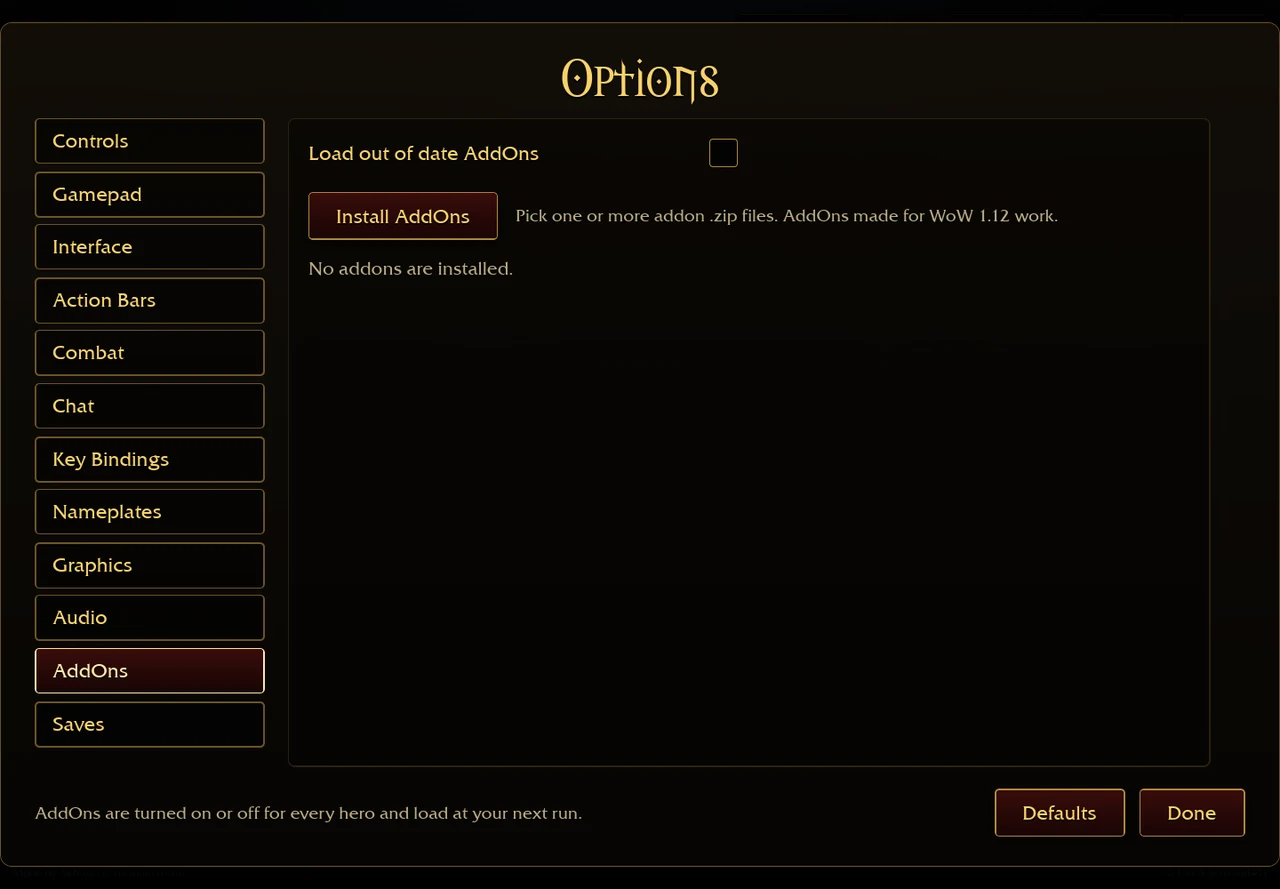
The existing game screenshot below shows the AddOns menu, not one of these custom layouts. Need only DPS? Compare meter windows first →
Browser: keep the ZIP intact
- Download the chosen addon ZIP from its author.
- Open the original game’s Options → AddOns → Install AddOns.
- Choose the ZIP and inspect the installed entry; enable the addon in the list.
- Start the next run so the game can load it. Install an updated ZIP through the same menu when the author releases one.
The browser installer stores files in IndexedDB for that browser and origin. They do not automatically follow the save file to a second device; clearing site storage can remove them. [2]
Desktop: check the directory level
- Open Options → AddOns → Open AddOns Folder in the downloaded game.
- Extract the author’s addon into that folder. For AZS Spell Meter the author documents AddOns/AZSSpellMeter/AZSSpellMeter.toc.
- If the extracted directory is AZSSpellMeter-main or has another wrapper folder, rename or move the actual addon folder so its name matches the .toc.
- Relog as the addon author instructs, then check the addon entry again.
If it is missing, outdated or invisible
| Symptom | Check | Next step |
|---|---|---|
| Not in the desktop list | Folder nesting and .toc name. | Correct the directory before downloading a different package. |
| Not present in a second browser | Where you originally installed the ZIP. | Install there separately; importing a game save is not an addon transfer. |
| Out of date | The addon’s interface/version and current author release. | The game offers Load out of date AddOns but warns compatibility may fail. |
| AZS meter offscreen | Saved window position. | Use /azsm resetpos; see the meter guide for view settings. |
Optional native helpers such as DLL updaters are separate from Lua addon files and cannot be assumed to run in the browser. This guide does not require installing a native helper. [2][3][1]
Sources & checks
- Aethus · original game ↗ (external website, opens in a new tab) · Original v0.127.0 / d1c85453 public client text inspected 29 October 2026. Single-source menu and talent evidence; no completed run or damage benchmark.
- Aethus · browser addon installer ↗ (external website, opens in a new tab) · Inspected 29 October 2026. ZIP handling, per-browser IndexedDB files and next-run loading.
- kex0 · AZS Spell Meter ↗ (external website, opens in a new tab) · README inspected 29 October 2026; v1.32 author-reported test on game 0.123.0. Commands and DPS windows are author documentation, not our current-patch test.
- migwynkriid13 · SurvivorsDragonUi ↗ (external website, opens in a new tab) · Author HUD groups, tracking and layout profiles; /sdui setup, read 1–3 Nov 2026.
- Kindagrey · Azerloot ↗ (external website, opens in a new tab) · Author README read 1 November 2026. Loot book, wishlist and run-history claims are author documentation, not our compatibility test.
- Cadoky · ASBuilder online ↗ (external website, opens in a new tab) · Web plan creation, stage copy, Save and ASB2 round-trip checked 4 Nov 2026; in-game import not tested.
- Cadoky · ASBuilder addon project ↗ (external website, opens in a new tab) · Author spell targets, stage sharing and addon instructions; 4 Nov 2026. In-game installation not tested.
- morderous · Survivor UI and Survivor Plates ↗ (external website, opens in a new tab) · Author README read 3 November 2026. UI and nameplate addons can be used independently; the launcher is optional.
- NicholasIzosimov · Azeroth Survivor UI ↗ (external website, opens in a new tab) · Author README read 3 November 2026. Describes compact movable frames, bars and panels, manual SurvivorUI folder installation and /sui opt.